Start Menu

The start menu

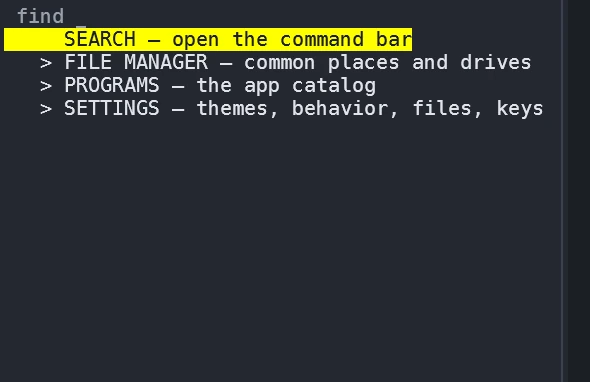
Ctrl-Space opens a menu with four roots: SEARCH opens the command bar, FILE MANAGER lists the common folders and drives, PROGRAMS holds the app catalog, and SETTINGS opens the settings window. The roots expand one at a time, and typing anywhere filters — apps, places and setting names rank as you type, so the menu is also a launcher you never scroll through.

The AGony start menu open with its four roots: SEARCH, FILE MANAGER, PROGRAMS and SETTINGS
A live capture: the start menu and its four roots — SEARCH, FILE MANAGER, PROGRAMS, SETTINGS.

Places and the panel

FILE MANAGER

The common folders — documents, downloads and friends — plus a probe of the machine's drives. Enter on a place re-roots the docked file panel there and reopens it if it was closed, so "go to my Downloads" is one keypress in a menu instead of a typed path.

Pinning to the desktop

Right-click a PROGRAMS row for Open, Pin to desktop and Copy launch command. A pin writes a shortcut stub and a tile appears on the desktop grid without a restart — double-click the tile (or focus it with the arrow keys and Enter) to launch. Documents and folders from the AGony desktop directory appear as tiles too.

PROGRAMS and the app directory

A curated catalog, installed for you

PROGRAMS ▸ Get more apps… opens the directory: a curated catalog seeded from the awesome-terminal and awesome-tui lists, licenses verified by hand, grouped into installed, available and a separate GPL shelf. Every row carries a description, its license and its source. Press Enter on an available entry and AGony shows the exact command it will run — Enter again installs, Esc cancels — through the app's own recipe: winget first, then scoop, then cargo or go, or a hash-checked release download into your AGony bin directory, which discovery scans afterwards. A failed install prints the recipe's own output and leaves nothing half-landed.

The same verbs work from a plain terminal: agony apps list prints the effective catalog, agony apps install <id> installs any entry, and agony apps add registers your own tool with a small manifest.

The GPL shelf, in the open

Copyleft programs are never bundled into AGony's download — that rule is enforced by a test in the catalog validator, not by good intentions. They ship as ordinary catalog entries on their own shelf, with their license named on the row, and they install through their own recipes like everything else.