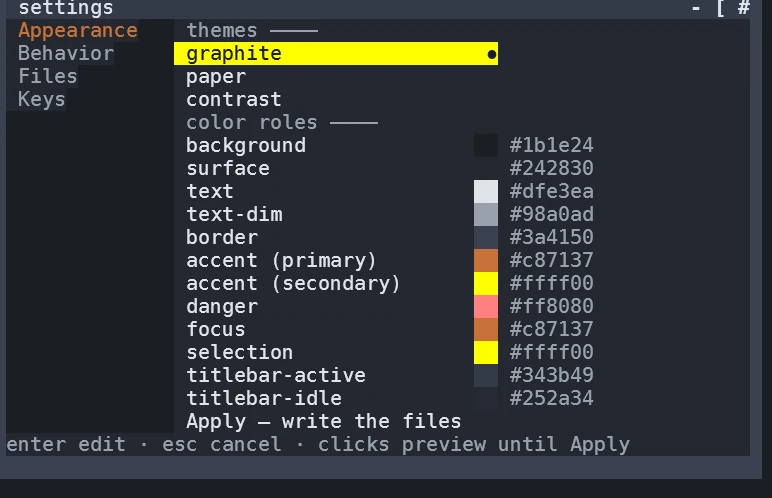
The settings window opens from the menu's SETTINGS root, focused on the section you came from. Appearance previews immediately: pick a theme and the desktop behind the window changes while you look at it. Nothing is written until you choose the Apply row; Cancel reverts the preview and closes.
A live capture: the settings window on Appearance — the theme list and every color role of the palette, with the Apply row and the mouse hints along the bottom.
Colors that argue back
Three themes, one refusing palette editor
AGony ships three built-in themes — graphite (dark), paper (light) and contrast — and every color in the interface flows through the theme applier; no widget picks its own. Recolor a single role in Appearance — accent, border, focus, any of them — and the editor measures the pick for contrast against its pair. A low-contrast choice is refused, with the failing pair named; a good one survives a restart through your own override file, and what renders is always the effective palette, never a delta you have to reconcile by hand.
Files, keys, and a text file you can hand-edit
The Files section holds the panel rules — hidden files, ignore handling, depth and entry caps. The Keys section lets you press a new combo for any action and refuses one that collides with another, naming both. Everything is also a plain settings.toml in your AGony config directory: edit it while the desktop runs and the change applies within about a second — one status line, no restart. A broken edit changes nothing and says so.
ASCII mode and the icon font
By default AGony runs in a mode that emits no Nerd Font codepoint at all — it renders correctly in any terminal, and that promise is pinned by a test. Install a Nerd Font and switch font_mode to get glyph titlebar buttons, folder icons and the glyph Start button; the doctor command prints a pattern you can eyeball to check whether your font carries the glyphs before you switch.
The first run
A fresh AGony opens a welcome window naming the three things to try — the start menu, the command bar and the file panel — with your actual key combos, and it never returns uninvited after Esc. Reopen it any time from SETTINGS ▸ About AGony. Beside it, the desktop carries a THANK-YOU.md tile from the first paint: every dependency with its license, generated at build time. agony thanks regenerates it whenever you want.
We use only functionality and necessary cookies. No third-party trackers ride this web.