AGony is a desktop environment for people who hate terminals but want to learn to like them, and for people whose memory for commands is short. It gives the terminal furniture: windows you can drag, a taskbar with a clock, a start menu with a file manager, and a command bar that suggests the command you half-remember — so the machine remembers for you.
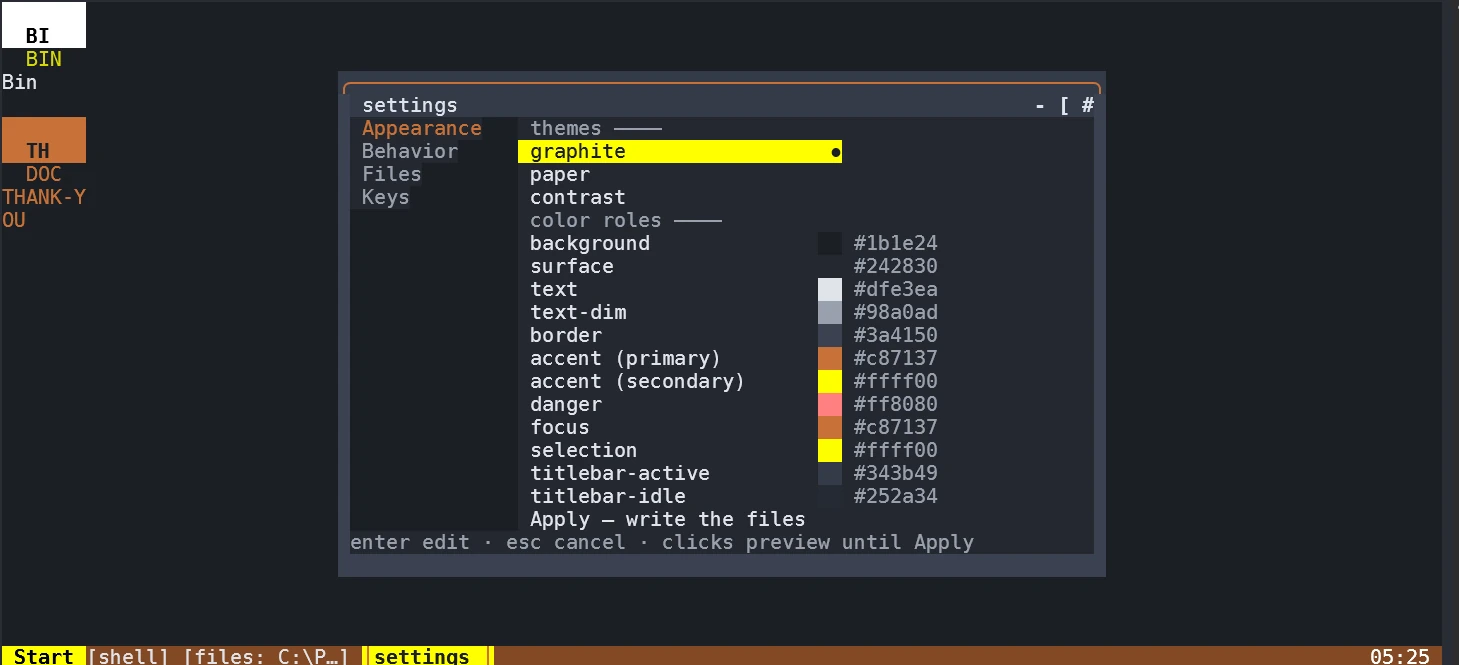
The AGony desktop: the settings window open on Appearance, the desktop tiles down the left edge, and the taskbar holding the Start button, the window buttons and the clock.
Version 0.9.0 is the current release. It is a real desktop, not a mock-up: the windows hold live shells, the suggestions come from a real completion engine, and everything runs on your machine — AGony has no accounts, no telemetry and no network calls of its own.
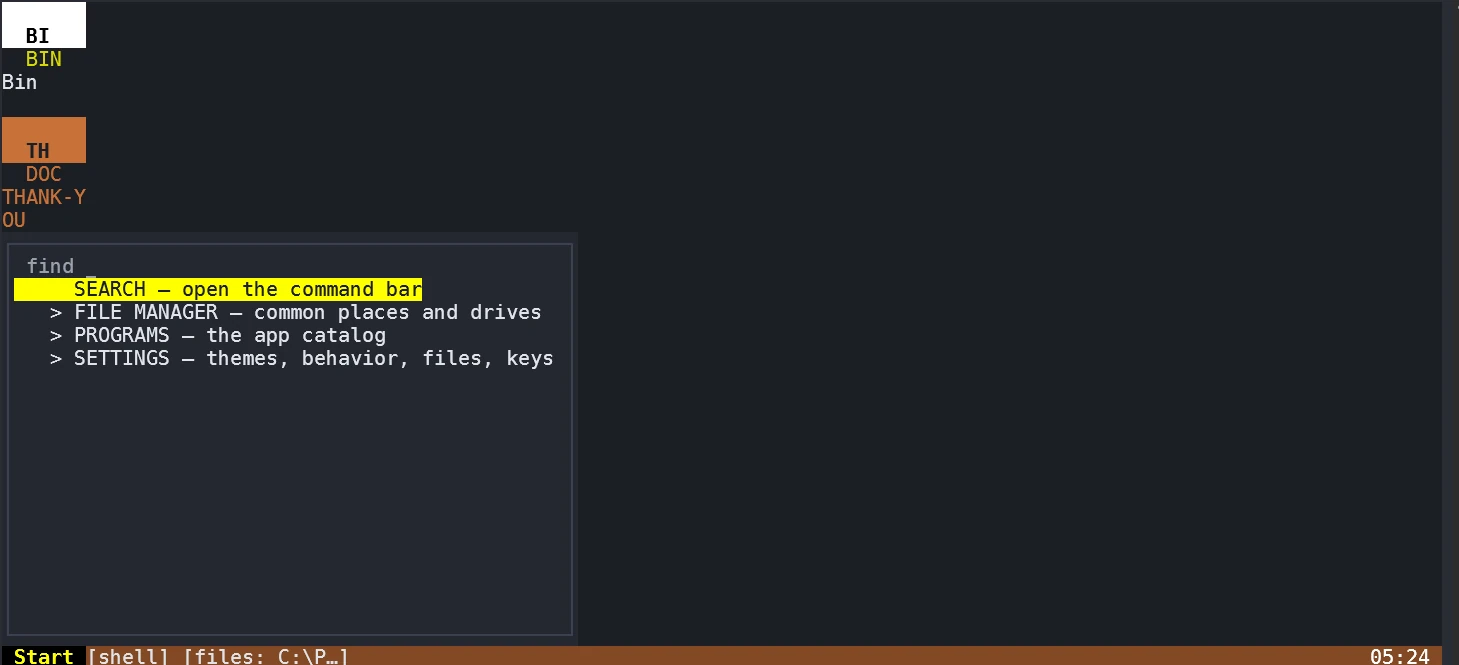
Open the start menu (Ctrl-Space) and AGony looks like any desktop you have used: SEARCH, FILE MANAGER, PROGRAMS, SETTINGS. Open the file panel and browse your folders with arrows instead of typing cd paths. A first-run welcome window names the three things worth trying, and it stays away after that.
The command bar finishes your sentences
Press Ctrl-K, type git che, and the bar suggests checkout — the completion engine behind it knows around a thousand commands. Type the name of an app and it offers to launch it. Nothing runs until you press Enter, so a wrong guess costs you nothing. Grab a file in the panel with g, drop it into the bar with Ctrl-G, and a menu shows exactly how the path will be pasted — the name, the absolute path, or the path relative to where you are. No more mistyped paths.
It installs terminal apps for you
The start menu's PROGRAMS section opens an app directory: a curated catalog of terminal programs with a description, license and source on every row. Press Enter on one, see the exact command that will run, confirm once, and AGony installs it through winget, scoop, cargo or a hash-checked download. Copyleft apps are never bundled into the download — they sit on their own shelf with their license in the open.
You can point at it
Click a window to focus it, its titlebar buttons to drive it, a taskbar button to minimize or restore. Right-click a desktop tile for Open, Delete document and Copy path; right-click a start-menu row for Open, Pin to desktop and Copy launch command. Drag a titlebar to move, drag the bottom or right border to resize, and click your way through the settings window — every control that had a key still has it.
The start menu open over the desktop — click any row, and the highlighted one is where the pointer landed.
If the terminal is your home
Real shells, real processes, no sandbox
Every AGony window is a live pane running your actual shell — on Windows, PowerShell or cmd through a real ConPTY owned by the rmux multiplexer engine. AGony never wraps your processes in anything: when a window closes, that pane's program ends, and when the desktop quits with Ctrl-Q, the session survives — run AGony again and your windows come back, adopted and titled.
Keyboard-first, and every key is yours to rebind
The whole desktop drives from the keyboard: Ctrl-E cycles windows, Ctrl-M minimizes, Ctrl-F maximizes, Ctrl-W closes, Ctrl-K is the command bar. The mouse works too — click windows, buttons and menus, right-click tiles and start-menu rows, drag titlebars and the resize borders — but it is a convenience, not a requirement. Every reserved combo can be rebound in SETTINGS ▸ Keys, and AGony refuses a binding that collides with another, naming both.
History that survives hard kills
Every command-bar run lands in a history file that stays valid even after a hard kill, and previous lines reappear in the bar's suggestions above the completion engine's — a failed command wears a ✗ marker so you can skip re-running the ones that hurt. The agony history command prints it from outside; agony doctor reports the environment; agony selftest proves the hosting chain end to end.
Built on an engine, not on luck
AGony never spawns a child process into a window itself. It asks the rmux daemon for a pane, the daemon owns the terminal plumbing and the process tree, and AGony renders pane snapshots and forwards input through the SDK. That separation is what keeps a window manager inside a terminal stable — the desktop is a tenant with good manners, not a new kind of shell.
Under the hood it is Rust: ratatui draws, crossterm reads input, rmux hosts, carapace completes. Every dependency is credited where you can see it — agony thanks writes a THANK-YOU.md onto the AGony desktop listing each crate and its license.
The feature pages carry captures of the real desktop — not a mock-up.
Where it stands
Version 0.9.0, honestly labeled
AGony is Windows-first: Windows 10/11 64-bit is the platform the desktop is walked on. The same source builds and passes its test suite — including an end-to-end hosting self-test — on Linux and macOS, and the release pipeline packages archives for all three, but the Linux and macOS desktops have not yet had their full manual passes; treat them as young. It is all open source under the studio's ethical licence, and the license page says what that lets you do.
The download page has the archive, its checksum and the two free prerequisites. The comparison page puts AGony next to tmux, Zellij and Windows Terminal — including the rows where they win.