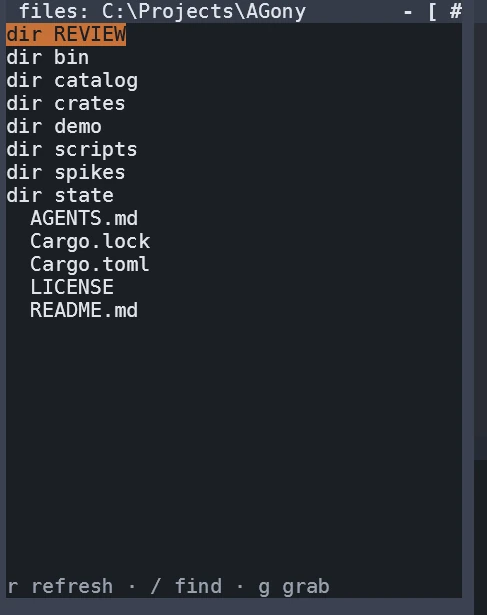
The panel is a tree of your working directory docked beside the shells. It is ignore-aware with git's exact semantics — inside a repository, target/ and friends simply do not appear, because the walker is ripgrep's. Arrows navigate, right expands a folder inline, left collapses, / opens a fuzzy search with matched characters highlighted, r refreshes.
A live capture: the file panel open on a working directory, with the key hints — r refresh, / find, g grab — along its bottom edge.
Grab, drop, choose the exact text
The paste menu
Press g on a file to grab it — the panel title gains "held" — then Ctrl-G to drop it into the command bar. The paste menu opens with three rows: the bare name, the absolute path, and the path relative to the bar's working directory. Every row shows the exact string it will insert, and Enter inserts it quoted at the cursor. Esc drops the held file. The three forms are computed by one small pure module with its own tests — the same math everywhere, no path is ever typed by hand and mistyped.
The panel's own settings
Hidden files, ignore rules, depth and entry caps are settings — show everything, respect nothing, or keep the calm defaults — and a refresh applies them without a restart. Enter on a folder in the start menu's FILE MANAGER re-roots the panel anywhere you like.
Who it serves
If cd is where you get lost
You see where you are, you see what is around you, and moving means arrows — the directory stops being a concept you hold in your head and becomes a place you look at. Dropping a file into a command means the path is right because you never typed it.
If you already know where your files are
The panel is gitignore-aware the way your tools are, so it shows a work tree, not a cache dump; the fuzzy find is a keystroke; and holding a file while you compose a command in the bar is faster than a copy-paste round trip through the mouse — the relative-path form lands exactly right for the pane you are typing into.
We use only functionality and necessary cookies. No third-party trackers ride this web.